SoundCloud has become one of the most popular platforms for discovering new music, indie artists, podcasts, DJ sets, and exclusive tracks you won’t find anywhere else. But while streaming is convenient, it doesn’t always fit every lifestyle. Maybe you want to listen while traveling, save mobile data, or keep your favorite tracks permanently available. Unfortunately, SoundCloud doesn’t make it easy to download music as MP3 files—especially for offline use outside the app.
So how can you download SoundCloud music to MP3 safely, efficiently, and with high quality? The answer lies in using a professional audio recording solution like ViWizard Streaming Audio Recorder. In this guide, we’ll walk you through why downloading SoundCloud music is useful, common challenges users face, and how ViWizard offers the perfect workaround for effortless MP3 downloads.
Why Download SoundCloud Music to MP3?
SoundCloud is designed primarily for streaming. While some creators allow direct downloads, most tracks are streaming-only. This limitation leads to several common frustrations:
- No offline playback without the SoundCloud app
- Internet dependency when streaming on mobile data
- No MP3 ownership of your favorite tracks
- Playback restrictions when traveling or using other music players
Downloading SoundCloud music as MP3 files solves all these issues. MP3 files are lightweight, universally supported, and can be played on any device—phones, computers, MP3 players, car systems, or smart speakers.
Can You Download SoundCloud Music Directly?
SoundCloud only allows downloads when artists enable the download option. If the download button doesn’t appear, there’s no official way to save the track as an MP3. Even SoundCloud Go+ offline mode stores files in a protected format that cannot be exported or played outside the app.
That’s why many users look for alternative solutions that allow them to record and convert SoundCloud music to MP3 while preserving audio quality.
The Best Solution: ViWizard Streaming Audio Recorder
ViWizard Streaming Audio Recorder, one of the best downloader for SoundCloud, is a powerful and user-friendly tool designed to capture streaming audio from popular platforms, including SoundCloud. Instead of relying on limited download buttons, ViWizard records audio as it plays and automatically saves it as standard audio files such as MP3, WAV, AIFF, FLAC, and more.
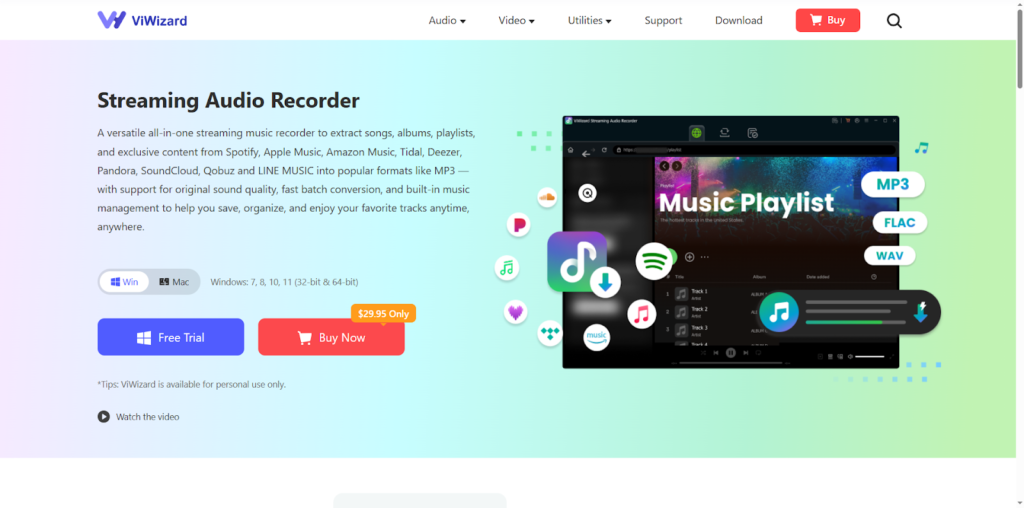
This makes it an ideal solution for anyone who wants to download SoundCloud music to MP3 without complicated setups or technical knowledge.
1. High-Quality MP3 Recording
ViWizard captures SoundCloud audio with excellent sound clarity. You can customize bitrate, sample rate, and output format to ensure premium listening quality.
2. Supports Multiple Streaming Platforms
Beyond SoundCloud, ViWizard works with Spotify, YouTube Music, Apple Music, Tidal, Deezer, and more. One tool covers all your streaming needs.
3. ID3 Tag Recognition
Song titles, artists, albums, and cover art are automatically added to your MP3 files for organized music libraries.
4. Easy-to-Use Interface
Even beginners can record SoundCloud music with just a few clicks. No advanced audio knowledge required.
5. Offline Playback Anywhere
Once saved, your MP3 files can be transferred to any device and played with any media player—no internet required.
Step-by-Step: How to Download SoundCloud Music to MP3
Using ViWizard is a straightforward process. Here’s how to build your offline SoundCloud library in just a few steps:
Download and Install: Begin by downloading ViWizard Streaming Audio Recorder from the official website. Follow the simple installation instructions for your Windows or Mac computer.
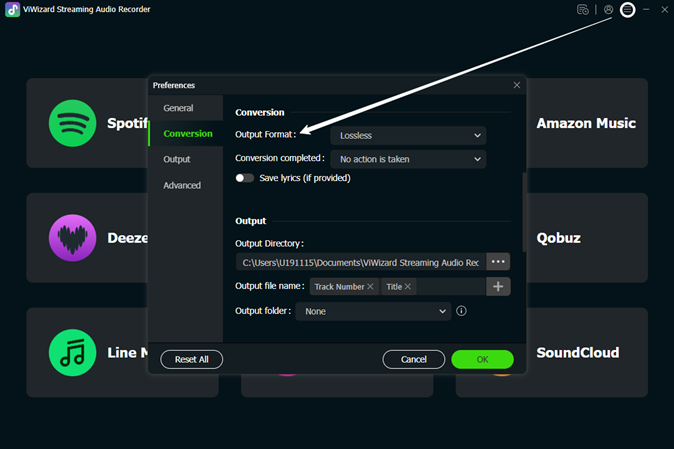
Configure Output Format: Run ViWizard and you will see all available streaming music sources. In the upper right corner, click the menu bar > preferences to open the settings. First, you can choose MP3 as the output audio format. Then, if needed, you can adjust other audio parameters for SoundCloud music, such as the bitrate, sample rate, and channel.
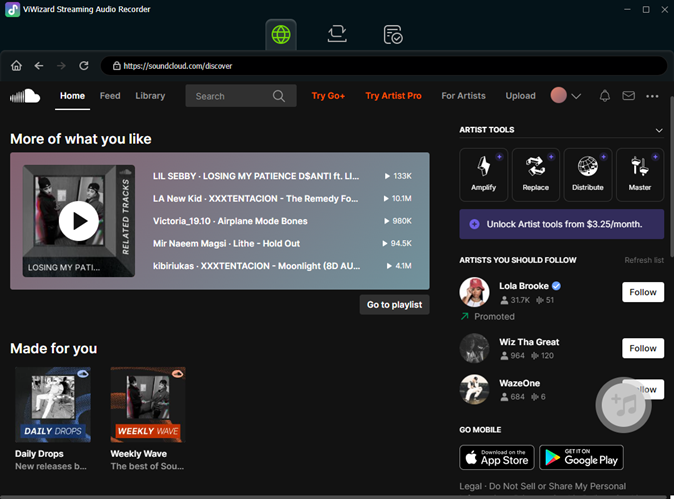
Choose SoundCloud and Log In: Go back to the main page and select SoundCloud. In the integrated web player, log in to your account, and then you will be able to see your entire music library on SoundCloud.
Importing Songs from SoundCloud to ViWizard: Browse your music library and select the songs/playlists you want to download. Open the songs/playlists and click the “+” button to add them to ViWizard.
Save as MP3: In the Converting panel, click the Convert button to start the conversion. Simply wait a moment, and after the download is complete, go to the Converted screen, where you will see all the downloaded songs. Your SoundCloud track is now a versatile MP3 file on your computer.
Why Choose ViWizard for This Task?
You might wonder what sets ViWizard apart in a sea of online converters and dubious software. The advantages are clear:
- Uncompromised Quality: It records the original streaming audio at up to 256 kbps, ensuring your MP3s sound fantastic.
- Total Control: You get to edit metadata, organize files, and manage quality settings before saving.
- Versatility: While perfect for SoundCloud, ViWizard works with any streaming service or audio source on your computer, from Spotify and Apple Music to other popular streaming platforms.
- Safety & Privacy: As a desktop application, it operates locally on your machine. There’s no need to upload sensitive links to unknown third-party websites, protecting your privacy and security.
Build Your Personal SoundCloud Archive
Music is personal, and your access to it should be too. With ViWizard Streaming Audio Recorder, you move from passive streaming to active collecting. Transform those fleeting SoundCloud streams into a lasting, portable MP3 library that moves with you—on your road trips, workouts, and flights, completely offline.
Don’t let your favorite discoveries be tied to an internet connection. Take control of your listening experience today. Download ViWizard Streaming Audio Recorder and start building the permanent, personal music collection you’ve always wanted.