Choosing remote employee monitoring software is not simply a matter of finding the longest feature list. The right platform must give managers reliable visibility without creating unnecessary administrative work, runaway subscription costs, or a culture of constant surveillance. This comparison ranks the strongest options for 2026 based on monitoring capabilities, workforce-management tools, pricing, scalability, and overall value.
For organizations specifically evaluating call center time tracking software, the same principles apply: prioritize accurate attendance records, real-time workforce visibility, activity trends, project or client reporting, and controls that let managers investigate exceptions without watching every employee continuously.
The quick verdict
Apploye is the best overall remote employee monitoring software for 2026. It combines time tracking, screenshots, app and URL monitoring, attendance, activity analytics, timesheets, tasks, invoicing, and payroll-related workflows at a lower published starting price than most comparable platforms.
Insightful is the stronger choice for analytics-led organizations, ActivTrak is excellent for workforce planning, and Teramind provides the deepest security and forensic monitoring capabilities. DeskTime, Controlio, and Monitask remain worthwhile alternatives for more specific requirements.
How the software was ranked
This ranking gives the greatest weight to five areas:
- Remote-work monitoring and visibility
- Practical time, attendance, project, and workforce tools
- Pricing and total value
- Administrative and privacy controls
- Scalability and enterprise readiness
Security-heavy platforms were not automatically ranked above operational tools. For most remote teams, software must help run day-to-day work—not merely record it.
Remote employee monitoring software comparison for 2026
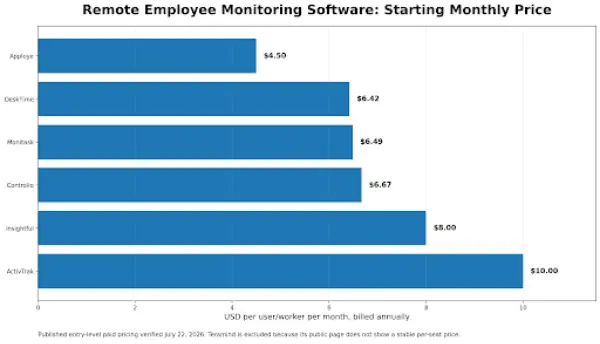
Pricing was verified against each vendor’s official pricing information on July 22, 2026. Unless otherwise stated, the figures below are monthly equivalents with annual billing. Taxes, add-ons, currency conversions, volume discounts, and promotional pricing may change the final cost.
| Rank | Software | Best for | Published starting price | Free option or trial | Important consideration |
| 1 | Apploye | Best overall value for remote and hybrid teams | $4.50 per user/month for Elite; Power is $8 | Free plan for up to 10 users; 10-day trial | Specialized features such as screen recording and stealth mode are add-ons |
| 2 | Insightful | Workforce analytics and operational visibility | $8 per seat/month | 7-day trial | Several advanced screen and security functions cost extra |
| 3 | ActivTrak | Workforce management, capacity, and productivity planning | $10 per worker/month | Free for up to 3 workers; 14-day trial | Screenshots and granular screen details require an add-on |
| 4 | Teramind | Insider-risk detection, investigations, and security monitoring | Custom quote | Free trial available | More complex and security-oriented than many small teams require |
| 5 | DeskTime | Automatic tracking with employee-friendly controls | $6.42 per user/month for Pro; Premium is $9.17 | 14-day trial | Screenshots are included in Premium rather than Pro |
| 6 | Controlio | Detailed computer monitoring and flexible deployment | $6.67 per user/month | 14-day trial | The listed licensing range begins at five monitored users |
| 7 | Monitask | Straightforward screenshot and time tracking | $6.49 per user/month for Pro; Business is $8.99 | 10-day trial | App and website monitoring requires the Business plan |
1. Apploye: Best remote employee monitoring software for medium to large teams
Apploye takes the number-one position because it offers the most balanced combination of monitoring, time tracking, workforce administration, and price.
The Elite plan covers the features most remote businesses are likely to use every day:
- Time and attendance tracking
- Screenshot monitoring
- App and URL tracking
- Real-time active view
- Activity analytics
- Timesheets and approvals
- Projects and unlimited tasks
- Client invoicing
- Payroll and member management
- Reports and integrations
The $8 Power plan builds on Elite with more screenshots, API access, and real-time instant screenshots. Larger organizations can request an Enterprise plan with SSO, account provisioning, guided onboarding, dedicated support, and higher limits.
Why Apploye ranks first
Many products in this category are strongest in only one area. A basic time tracker may lack meaningful activity visibility, while an enterprise surveillance platform may be too expensive or complicated for everyday workforce management.
Apploye occupies the useful middle ground. It can verify working time and computer activity, but it can also manage attendance, tasks, project budgets, timesheet approvals, invoices, and payroll documentation. That reduces the need to connect several separate systems.
Its free plan is also unusually practical. It supports up to 10 users and includes limited time tracking, screenshots, app and URL tracking, activity analytics, projects, timesheets, invoicing, and payroll history. The limits, like a lack of DLP, make it unsuitable for extreme monitoring, but it provides enough functionality for a growing team to evaluate the workflow properly.
Apploye pricing
- Starter: Free for up to 10 users
- Elite: $4.50 annually, $6 quarterly, or $7 monthly per user
- Power: $8 annually, $10.50 quarterly, or $12 monthly per user
- Enterprise: Custom pricing
- Free trial: 10 days, with no credit card required
Buyers should account for optional add-ons. Apploye currently lists stealth mode and additional screenshots at $2 per user per month, API access at $1, screen recording at $4, and on-premise hosting at $3 per user per month for qualifying deployments.
Best suited to
Apploye is a strong fit for remote agencies, outsourcing businesses, virtual-assistant companies, law agencies, professional-services teams, software companies, and organizations that need both employee monitoring and billable-time administration.
Apploye is also ideal as a call center time tracking software.
Main limitation
Businesses requiring advanced DLP, forensic investigation, content inspection, or highly configurable insider-risk rules may need a security-focused platform. Apploye’s advantage is operational breadth and value rather than maximum surveillance depth.
2. Insightful: Best for workforce analytics
Insightful is designed for businesses that want to turn employee activity data into operational decisions.
Its Workforce Analytics plan includes real-time overviews, capacity analysis, application and website usage, screenshots, and online support. The platform also supports monitoring, time and attendance, productivity trends, and automatic allocation of time to work activities.
Why it ranks second
Insightful is particularly useful when the business question is not merely, “Did this person work?” but:
- Where is team capacity being lost?
- Which processes consume too much time?
- Are teams overstaffed or understaffed?
- Which tools or workflows create delays?
- Where are margins being eroded?
The interface and product positioning emphasize analysis and process improvement more heavily than traditional screenshot-based supervision.
Insightful pricing
- Workforce Analytics: $8 per seat per month, billed annually
- Workflow Optimization: $12 per seat per month, billed annually
- Combined plan: $16 per seat per month, billed annually
- Enterprise: Custom pricing
- Free trial: 7 days
Advanced features can increase the effective price. The current pricing page lists Workspace Security at an additional $4 per seat per month, on-demand screenshots at $4, increased screenshot frequency at $3, and screen recording at $4.
Best suited to
Insightful works well for business-process outsourcing companies, support operations, finance teams, healthcare administration, insurance operations, and larger remote organizations that want workforce data for capacity and margin decisions.
Main limitation
Its entry price is reasonable, but buyers who require multiple security and screen-monitoring add-ons should calculate the full per-seat cost before signing an annual agreement.
3. ActivTrak: Best for workforce management and capacity planning
ActivTrak approaches employee monitoring as work intelligence rather than conventional surveillance. Its paid plans progress from basic work-activity tracking to workforce management and productivity optimization.
The $10 Work Activity Tracking plan includes automatic time tracking, real-time visibility, break identification, attendance and schedule adherence, app and website usage, and compliance alarms. The $15 Workforce Management plan adds utilization, productivity goals, location-policy validation, exception trends, offline meeting tracking, and potential false-activity detection.
Why it ranks third
ActivTrak is useful for senior operations, finance, and workforce leaders who need to evaluate:
- Capacity and workload distribution
- Schedule adherence
- Productivity trends
- Application usage
- Staffing requirements
- Work-location policies
- Potential false activity
- Coaching opportunities
The higher-tier Productivity Optimization plan adds workload balancing, workflow insights, organizational benchmarks, location-based productivity analysis, and AI-related reporting.
ActivTrak pricing
- Free: $0 for up to 3 workers
- Work Activity Tracking: $10 per worker per month
- Workforce Management: $15 per worker per month
- Productivity Optimization: $17 per worker per month
- Free trial: 14 days
- Billing: Annual contracts
The free plan provides basic activity visibility and 30 days of data history. Paid plans provide longer retention, beginning with six months on the $10 plan.
Best suited to
ActivTrak is a good choice for established remote or hybrid companies that want to improve utilization, staffing, technology adoption, and productivity without making screenshots the center of the management process.
Main limitation
Detailed screenshots, screen views, title bars, full URLs, alarms, and website blocking are provided through the separate Screen Details add-on. ActivTrak does not publicly display that add-on’s price on its main pricing page, so buyers need a complete quote before making a cost comparison.
4. Teramind: Best for security and insider-risk monitoring
Teramind provides the deepest monitoring and investigation capabilities in this comparison. It is designed for organizations that need to connect workforce visibility with security controls, behavioral rules, forensics, and data-loss prevention.
The Starter package covers visual evidence, live playback, website and application tracking, limited forensic telemetry, behavior rules, and customizable dashboards. UAM expands the platform with complete telemetry, activity-based rules, SIEM integration, keystroke logging, AI governance, and investigation tools. DLP adds content-based rules, sensitive-data detection, redaction, blocking, and prebuilt data-protection policies.
Teramind pricing
Teramind’s official pricing page currently shows Starter, UAM, DLP, and Enterprise options but does not publish stable per-seat figures in the page content. Buyers are directed to contact sales, and the price calculator begins with a five-seat selection. Monthly and annual billing options are presented, with the page advertising an annual saving.
Best suited to
Teramind is best for organizations with serious compliance, security, fraud-prevention, data-loss, or investigation requirements.
Main limitation
Pricing requires a sales conversation, and the platform’s policy configuration, telemetry, and investigative functions can require more administrative expertise than simpler time-and-productivity tools.
5. DeskTime: Best for automatic tracking and employee-friendly controls
DeskTime combines automatic time tracking with productivity calculations, application and website tracking, project tracking, document-title tracking, screenshots, reports, scheduling, and absence management.
It also offers a Private Time function, allowing personal computer use to be excluded from work monitoring when the employer enables that option.
DeskTime pricing
- Pro: $6.42 per user per month, billed annually
- Premium: $9.17 per user per month, billed annually
- Enterprise: Custom pricing for organizations with 200 or more users
- Free trial: 14 days
- Taxes: Displayed prices exclude VAT
The Pro plan includes document-title tracking, productivity calculations, and calendar integrations. Premium adds screenshots, broader integrations and API access, and shift scheduling.
Best suited to
DeskTime suits professional-services businesses, software teams, consultants, agencies, and remote organizations that prefer automatic time collection over requiring employees to start and stop timers throughout the day.
Main limitation
The advertised $6.42 Pro rate does not include screenshots. Teams that consider screenshots an essential monitoring requirement should compare competitors against DeskTime’s $9.17 Premium price instead.
6. Controlio: Best for detailed computer monitoring
Controlio combines productivity reporting with more technical computer-monitoring functions. Its Basic plan includes application and website analysis, AI-based activity categorization, behavior rules, screen live streaming, video recording, dashboards, audit controls, and cloud or on-premise deployment options.
The Advanced plan adds departmental productivity summaries, workload and burnout analysis, focus and multitasking insights, mouse-jiggler detection, REST API access, SSO, location tracking, and larger export limits.
Controlio pricing
- Basic: $6.67 per user per month, billed annually
- Advanced: $9.99 per user per month, billed annually
- Enterprise: Custom pricing for larger deployments
- Free trial: 14 days
The public comparison lists Basic and Advanced deployments for between five and 10,000 monitored users, while Enterprise is positioned for organizations starting at 100 users.
Best suited to
Controlio is suitable for IT-managed teams that want live screen visibility, activity rules, recording, detailed technology usage, security controls, and a choice of cloud or self-hosted deployment.
Main limitation
Its monitoring capabilities may feel heavier than necessary for teams whose only requirements are timesheets, occasional screenshots, and project billing.
7. Monitask: Best for straightforward screenshot tracking
Monitask provides an accessible combination of time tracking, screenshots, activity monitoring, projects, team management, and reporting.
The Pro plan includes time tracking, screenshots, project management, email reports, one integration, and one month of stored data. Business adds website and application monitoring, unlimited integrations, team management, employee scorecards, task management, client access, and two months of storage.
Monitask pricing
- Pro: $6.49 annually or $7.99 monthly per user
- Business: $8.99 annually or $10.99 monthly
- Business Premium: $12.99 annually or $15.99 monthly
- Enterprise: $15.99 annually or $19.99 monthly
- Free trial: 10 days
Business Premium adds more detailed URL reporting, document and search-query tracking, location features, advanced onboarding, and priority access to new features. Enterprise is listed for organizations with 100 or more employees and adds higher API limits, audit logs, custom reports, security assessments, and VIP support.
Best suited to
Monitask fits small and midsized remote teams that want recognizable proof-of-work features without adopting a full workforce-intelligence or insider-risk platform.
Main limitation
The lowest-priced Pro plan does not include website and application monitoring. Teams needing those records should use the $8.99 Business price when comparing costs.
Which remote employee monitoring software should you choose?
For most remote and hybrid teams, Apploye should be the first choice because it provides the best balance of employee monitoring, time tracking, attendance management, project tracking, timesheet approvals, invoicing, payroll records, and affordability.
Its combination of screenshots, app and URL monitoring, real-time activity visibility, and workforce-management features makes it suitable for agencies, call centers, outsourcing companies, professional-services firms, and growing distributed teams.
Organizations that need deeper workforce and capacity analytics may prefer Insightful, while ActivTrak is a strong alternative for larger companies focused on staffing, workload distribution, schedule adherence, and productivity planning. Businesses with advanced compliance, insider-risk, investigation, or data-loss-prevention requirements should consider Teramind, although its complexity and custom pricing make it less practical than Apploye for everyday remote-team management.
Questions to ask before buying
Will employees use manual or automatic tracking?
Manual timers create clear start and stop boundaries, but employees can forget to activate them. Automatic tracking improves coverage but requires carefully configured privacy rules.
How much historical data do you need?
One month of screenshots or activity records may be adequate for payroll review. Compliance, client disputes, security investigations, and long-term productivity analysis may require substantially longer retention.
Do you need productivity management or security monitoring?
These are related but different requirements.
Productivity-focused software helps with time, attendance, staffing, capacity, projects, and workflows. Security-focused software adds behavior policies, content inspection, forensic records, DLP, risk scoring, and incident response.
Paying for a security platform when you only need reliable timesheets can create unnecessary cost and complexity.
Can monitoring be configured by team, role, or schedule?
A design team, call-center team, finance department, and executive group may need different monitoring policies. Look for role-based controls and avoid collecting data that managers do not genuinely need.
What will implementation do to employee trust?
Monitoring works best when the organization explains what will be collected, when tracking runs, who can access the records, how long the data is retained, and how it will be used.
Use the platform to identify operational exceptions and support better decisions—not to turn normal fluctuations in keyboard or mouse activity into automatic performance judgments.
What is the best remote employee monitoring software in 2026?
Apploye is the best option for most remote teams because it combines screenshots, app and URL monitoring, activity analytics, time tracking, attendance, projects, timesheets, invoicing, and payroll-related tools at a published annual price of $4.50 per user per month.
What is the cheapest option in this comparison?
Apploye has the lowest published paid starting price at $4.50 per user per month with annual billing. It also provides a free plan for up to 10 users, although the free plan has limits on screenshots, activity history, app records, URLs, and projects.
Which product is best for enterprise security?
Teramind offers the strongest combination of activity telemetry, forensic monitoring, behavior rules, insider-risk investigation, keystroke logging, AI-governance controls, and DLP capabilities among the products compared here.
Which product is best for workforce analytics?
Insightful and ActivTrak are the strongest analytics-focused options. Insightful emphasizes capacity and process intelligence, while ActivTrak provides tiered workforce-management and productivity-optimization products.
Does remote employee monitoring software take screenshots?
Most products in this comparison support screenshots, but plan availability differs. Apploye includes screenshot monitoring in its plans, Insightful’s Workforce Analytics plan includes screenshots, DeskTime requires Premium, ActivTrak uses a Screen Details add-on, and Monitask includes screenshots in Pro.